I’ve spent much of my career trying to get users onboarded to a product. Whether it’s a job board, a weight loss app, or a caregiving platform, users can’t realize how awesome your product is if they don’t set it up. It’s like buying furniture from IKEA, but never building it. Your TV stand might be nice if you actually set it up.
I’ve also spent much of my career trying to understand what users do in the products I work on so I can build features that better suit their needs. It’s kind of like being a nerdy Sherlock Holmes. You look at user behavior and try to deduce what they were doing and if they actually achieved it or not.
One tool I’ve used to investigate my users comes from a company called PostHog (yes, that is the real company name). Today we’re dissecting how PostHog massively improved their activation and revenue metrics by making their complex onboarding much, much easier.

They have a very cute hedgehog mascot
The Backstory
How PostHog got here.
Before we go any further, we need to talk about event tracking (I’m not talking about your Partiful calendar). Quick primer below, because it’s hard to appreciate what PostHog pulled off without it.
Event tracking is the process of “writing down” every time someone does something in your app, so you can see what people actually do. Every time a customer does something you care about, the app makes a note. Signed up. Added a payment method. Completed first purchase. Bounced during a search. Each note is an “event.” Put them all together, and you can answer questions like “how many people who start signing up actually finish?”
But to do this correctly, you first have to tell the code where each of these events occurs beforehand. If you miss labeling an event, it never gets tracked. Label it wrong, and you get bad data, which is actually worse. Try explaining to your boss why last quarter’s dashboard was wrong the whole time.
So event tracking is really useful, but also difficult to get right.

Back in my day, we had to create all of our own charts
It has a generous free tier where the first million events each month are free. But of course, PostHog can’t tell you anything useful until you set it up.
Historically, that meant finding the right framework documentation, pasting in the SDK, deciding which product events mattered, writing the tracking code, and eventually building useful dashboards. Incredibly tedious stuff.
Some savvy engineers figured their AI coding assistants could handle the grunt work. However, these assistants hallucinated API keys and used outdated code to perform integrations, so it wouldn’t work.
A growth employee at PostHog binged session recordings of users trying to onboard and found a “long list of failure modes.” Users were struggling. So were their AI coding assistants.

So PostHog asked themselves, “What if AI could handle the onboarding instead?”
SPONSORED BY

Stride builds teams for early-stage NYC startups and is run by two former PMs who spent the last decade hiring at companies like Amazon, Microsoft, PwC, and VC-backed startups.
If you're struggling to hire or looking for your next role, reach out to their founders: Zakir Tyebjee and Wes Repass.
The Tiny Big Move
The single decision that changed user behavior.
PostHog shipped the first version of its installation wizard in early 2025. One of its builders estimated that it made the right edits about 80% of the time, but “completely failed” the other 20% (that’s a B- grade, definitely not good enough to bring home to my parents).

Enter the humble AI Agent. I won’t bore you with the technical explanation. What matters is that an AI agent can run in a loop and continue to improve upon a solution before presenting it.

Once the wizard was agentic, they realized that the biggest improvements they could make to it were to give the wizard more context, but also at the right time. PostHog is a complicated product, with thousands of different setup combinations depending on the coding language and framework you are using. Each setup requires some technical trivia, which the wizard can get wrong if it doesn’t have the appropriate knowledge. By delivering the right context only when the wizard needs it (via MCP), they can make sure that the wizard delivers a predictable and correct user experience.
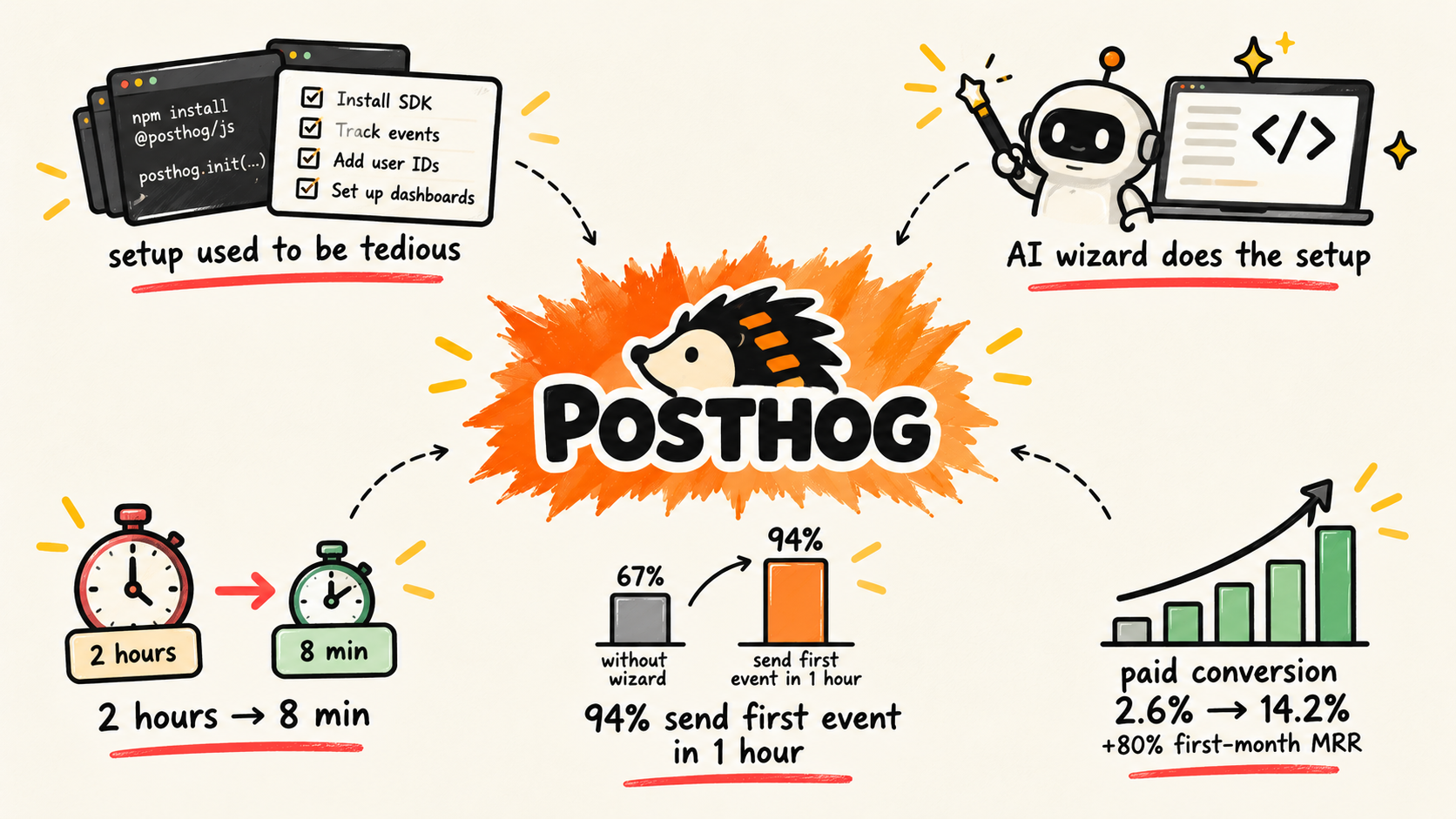
Today, you can run the wizard with just one command. The wizard scans your codebase and application architecture, figures out what kind of product you’ve built, creates custom events around real product flows, writes the instrumentation into your client and server code, and generates initial insights and dashboards. It can complete two hours of onboarding work in just 8 minutes.
Then after those eight minutes, you can review the dashboards the wizard has created to make sure that everything looks correct.

The results are pretty striking
The success of the wizard is so impressive that I wish I had thought of it myself. 94% of wizard users instrument and send their first event within the first hour. For non-wizard users, that number drops to 67%. And more importantly, the wizard 5x’d paid conversion from 2.6% to 14.2%, leading to an 80% larger first-month MRR.

It’s a pretty compelling picture: if your product requires a lot of setup before users see what the product can do., use AI to do the work for your user and watch the money come in.
The Psychology
Why do users get so easily deterred by onboarding? Why is it so hard to get them to activate? In the case of PostHog (and many other products), there is a lot to do and hold in your head before the product has given you anything back.
Psychologists call this cognitive load. It’s the total amount of mental effort needed to understand and interact with an interface. Aka the amount of thoughts you’re juggling. Two categories that help make up overall cognitive load:
Intrinsic Load: The inherent difficulty of the task or material itself. For example, onboarding for a photo-sharing app has a low intrinsic load, while onboarding for a tax platform has a high load.
Extraneous Load: The mental effort wasted on poorly designed instructions, confusing layouts, or unnecessary distractions. This is what you can control as a product expert.
You can’t make a topic like event analytics simpler, but the wizard removes the extraneous load by doing the work for the user. You don't have to hold a dozen setup decisions in your head and can instead outsource them to the wizard.

In a randomized experiment from H&R Block, some low-income tax clients received personalized information about financial aid. Others had most of their FAFSA automatically filled using information from the tax return they had just completed, then finished it with a preparer in about eight minutes.
For students who received filing help, that help increased FAFSA filing by 15.7 percentage points and college enrollment by 8.1 points. However, only providing aid eligibility information without also giving assistance with the form had no significant effect.
So talking through a complex process, even if personalized, isn’t enough to actually help users when the intrinsic load is high; you need to take work off their plate.
SPONSORED BY

You bought something online with a credit card. You may have even used the “right” credit card.
But did you:
Activate offers on your credit cards
Use a shopping portal
Check for heavily discounted gift cards
Shoppers who use Savewise earn 7-10x more points & miles for things they’re already buying.
Savewise finds every way for you to earn rewards and puts them all in one place.
The Takeaway
When users have to do a lot of work before they experience value, ask how much of that setup burden the product can absorb.
You can do this in a few different ways:
Infer what you can. A codebase, transaction history, CRM, website, files, calendar, or other existing data can tell you most of what you need.
Let users give you messy inputs. A personal finance app could let someone say, “I have checking at Chase, a savings account at Ally, and a Fidelity brokerage,” then surface the right integrations one at a time instead of presenting a wall of financial institutions.
Make reasonable assumptions, then ask for corrections. A weight-loss app could start with a photo and a few basic questions, estimate the information it needs to build an initial plan, and let the user correct anything it got wrong. (Although you might not want to guess weight…)
Use outside context to create the starting point. A job marketplace could look at similar open roles, then draft the title, description, salary range, and requirements for the employer instead of opening on six blank fields.
Break unavoidable complexity into decisions the product can guide. A mortgage app can’t make buying a house simple. But it can ask one question at a time, explain why it needs each answer, pull documents automatically where possible, and only surface the next task when it matters.
Do the time-consuming part. A marketplace seller might upload six product photos and have the product crop them, identify the item, suggest a category, estimate a price, and draft the listing.

How you approach onboarding depends on your product, but there is always something more you can do for the user. AI provides the intelligence to reduce cognitive load, but you need to get creative with how to leverage it.
I’d start by asking where in our onboarding are we making users think, decide, type, configure, search, or wait, and what would we need to do it on their behalf?
Sorry if the post was a bit more technical than usual. I’ve obsessed over improving onboarding conversion for many years, and I’m bullish on AI being a game-changer for it. A special shoutout to all the new subscribers who joined this week; welcome on board (see what I did there) to the tiny big movesment.
Reply to this email with any cool onboarding experiences you’ve been through that I should check out. Or if you can’t think of one, tell me your Halloween costume!
— Amaraj (aka have given up on at least four apps during their onboarding)
The Meme
